
Ask to take an assignment that belongs to a colleague. For an assignment offered on the job board, apply through the board.
If you cannot see your colleague's schedule or the action, ask your administrator. The phone calls an assignment a shift.
On your phone
- Open Schedule, open the schedule selector and choose the configured filter that contains your colleague. Choose the date and open their shift. If no suitable filter appears, ask your administrator.
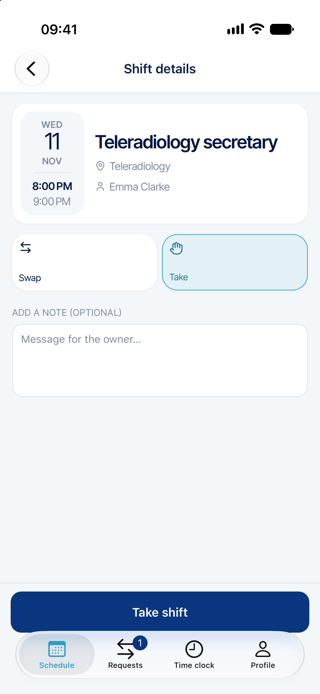
- Tap the shift, open View details if needed, then tap Take.
- Check the colleague, role, date and hours. Add a note if useful, then tap Take shift. If rule violations appear, the request has not been sent. Close the message and resolve the issue or contact your administrator. Only users with the explicit override permission can submit despite these violations.
- Follow the request in Requests > Sent.
On the web
- Open Scheduling > Staff Requests > Manage Change Requests, then click Add.
- Choose Take Assignments, then click Start Wizard.
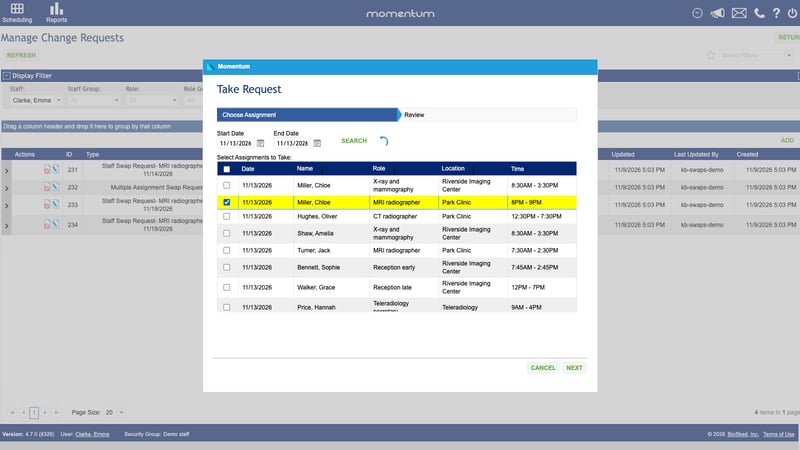
- Choose the date range and click Search. Select the assignment or assignments you want to take from one colleague, then click Next.
- Review the work you will receive, add a comment if useful, then click Submit.
Good to know
- The owner usually agrees first, then an administrator decides. You receive the assignment only after final approval.
- You must be eligible for the role on the assignment date. Ask your administrator if the expected assignment is missing.
- The phone handles one shift at a time. The web can include several from the same person.
- A pending request can hide the action. After an error, check your requests before trying again.