
Schedule to payroll, in one tool.
Hours are counted at each clock-in, not rebuilt at month end.
Already a customer? Talk to your Customer Success contact.
One tool for the schedule and the hours.
The schedule in one tool, the hours in another: at month end, someone recounts everything. In Momentum, every punch lands on the schedule.
At month end the hours are already counted: every punch has found its assignment, and only the exceptions need a look.
Heard on site
“We have counters everywhere […] and actually, we are lost in the counters.”
Our answer: counters that all start from the same schedule.
Built in the field, with the teams.
This module comes from many visits on site, in the departments, with the teams who schedule in Momentum every day.
For HR and management
Month end: check the exceptions, not rebuild the hours.
- One tool instead of two, if you want it: one tool less to deploy and learn.
- The hours counted are those of the schedule, on-call included.
Five steps, one chain.
The published schedule is the reference. Everything else follows from it.
The day beforeSchedule
You publish the schedule.
Shifts, on-call, several sites: as you do today.
07:56Clocking
Clock in from the app your staff already use.
One Time clock tab, one button: clock in or clock out.
Shared computers and badge readers keep working: three ways to clock, one set of rules.
08:00Check
Small gaps stop costing time.
Within the gap you allow, a punch can be rounded to the planned time; beyond it, the punch is kept as punched and flagged.
The schedule is never changed.
A check per site, without tracking anyone.
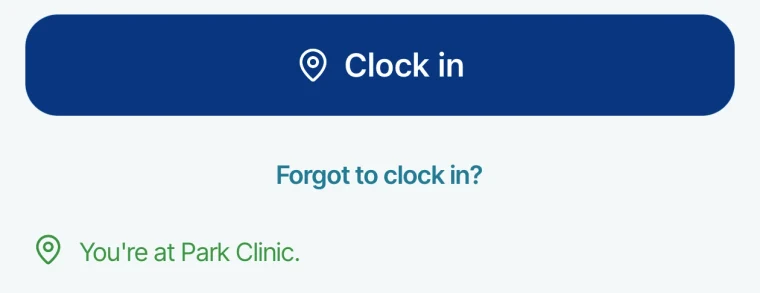
The phone reads its location only while the Time clock screen is open, on sites with a zone, and sends only the distance to the site and its accuracy. Outside the zone: kept and flagged, not refused because of location.
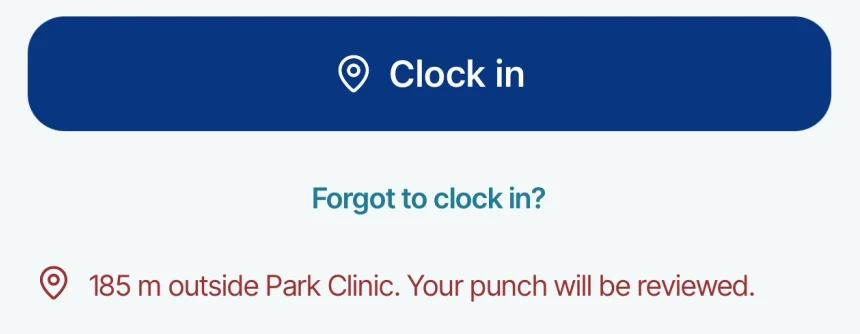
What the person sees before clocking (capture of the app). 15:04Counters
Overtime: your thresholds, your rates.
Each policy sets its thresholds and multipliers. Depending on the policy, the uplift is paid or goes to a recovery reserve.
Time off follows its own policies.
Month endPayroll
At month end, HR checks, then closes.
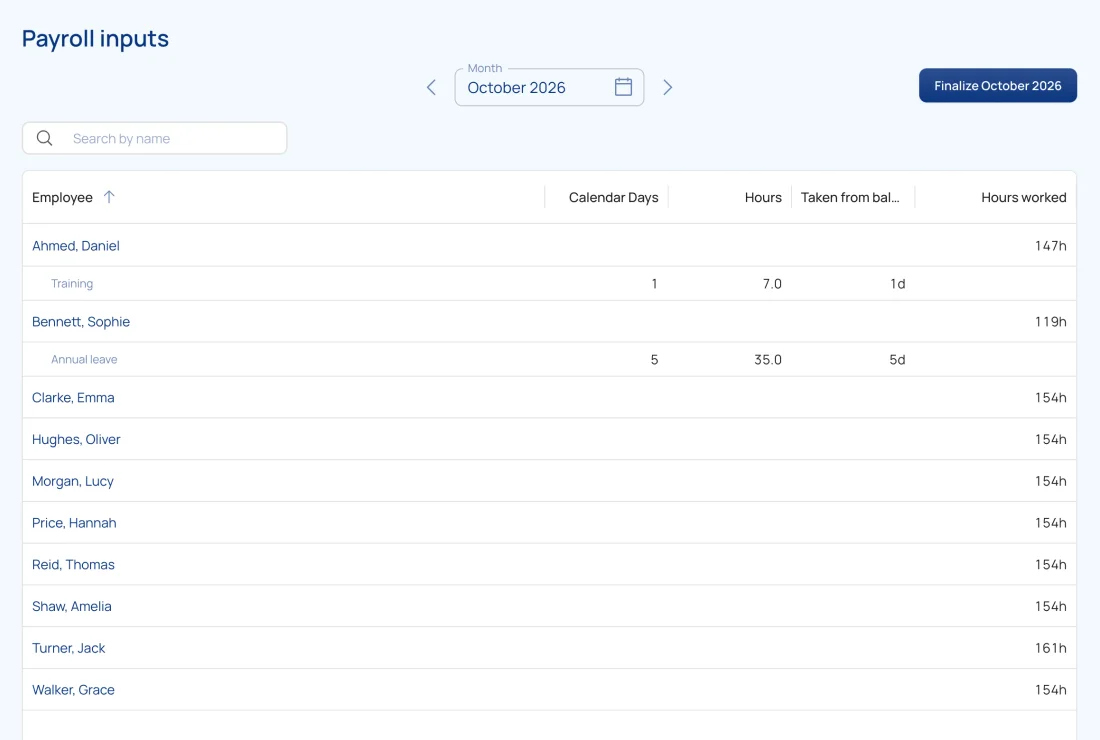
Payroll inputs are what payroll needs each month: hours, absences, days counted. HR checks them employee by employee, by payroll group.
- A closed month stays closed
- A later change comes back as a correction.
- One export file
- Hours and absences go to your payroll as an export file, set up with your Customer Success contact.
Momentum prepares the figures. Your payroll system computes pay.
What we believe
A time tool does not know your medical schedule. Momentum does: that is where the hours are counted.
What each kind of tool covers.
| A time-and-attendance tool alone | A scheduling tool alone | Momentum | |
|---|---|---|---|
| Builds the medical schedule: on-call, shifts, swaps, several sites | No | Yes | Yes |
| Clocking in and out | Yes | No | Yes |
| Punches matched to the assignment in the medical schedule | No | No | Yes |
| Hours, overtime and time off counted by your rules | Yes | No | Yes |
| Hours and absences checked and closed each month for payroll | Yes | No | Yes |
Already have an HRIS or a time and attendance tool? Momentum integrates with it.
Already have a tool? Momentum integrates with it.
You want a single tool
Scheduling and working time in the same app: one tool less to deploy.
You already have an HRIS or a time and attendance suite
Momentum does not replace it: it integrates with it, through an exchange file set up with you. The hours counted on the schedule are passed on to it.
How to get started
Each feature is switched on for your organization, with your Customer Success contact, when you are ready.
You already clock with Momentum
Nothing changes for badge readers or clocking on a computer. Clocking in the app is added for the whole organization once it is switched on.
Talk to your Customer Success contact.
You schedule with Momentum but do not count hours yet
Clocking, tolerances and payroll inputs are switched on at your pace. No change of tool.
Talk to your Customer Success contact.
You are new to Momentum
We show you the Time clock tab, a site zone and a month being closed, with your schedules and your rules.
Book a demoFrequently asked questions
What about staff without a smartphone?
They clock on a shared computer or a badge reader, as they do today. The app adds a way to clock; it does not replace the others.
What happens when someone clocks in outside the zone?
The punch is recorded with its distance from the site and flagged for review; it is not refused because of location. Before clocking, the person sees that they are outside the zone and that the punch will be reviewed. An administrator then approves or rejects it.
Does Momentum follow where staff go?
No. The phone reads its location only while the Time clock screen is open, on sites with a zone. It sends its distance from the site and the accuracy of that reading, never its position. Momentum keeps no coordinates and no route, and a site without a zone never asks for location.
Do staff representatives need to be involved?
Usually, yes: in most European countries, a clocking system is discussed with staff representatives before it starts. This page says what the app reads and keeps, so you can put it to them. The legal assessment stays with your organization.
What if someone forgets to clock in or out?
They tap “Forgot to clock in?” or “Forgot to clock out?”, enter the time and, if they wish, a comment. The punch is recorded and waits for an administrator’s approval.
Do our badge readers keep working?
Yes. Badge readers and clocking on a computer work as they do today, with the same review pages. Every punch, whatever its source, follows the same tolerances and counters.
Can the hours go to our payroll?
Yes. Hours, overtime and time off leave Momentum as an export file, set up with you for your payroll. Momentum prepares the figures; your payroll system computes pay.
How much does it cost?
Clocking and working time are available in Europe and priced on quote, depending on your organization and the modules you use. Ask us for a quote.
Does Momentum replace our HRIS?
No. Momentum replaces neither an HRIS nor a full time and attendance suite. If you have one, Momentum integrates with it through an exchange file set up with you, and passes on the hours counted on the schedule. If you want a single tool for scheduling and working time, this module may be enough: we look at it with you.
What does EU law expect on working time?
On May 14, 2019, the Court of Justice of the European Union ruled (case C-55/18, CCOO) that EU member states must require employers to set up an objective, reliable and accessible system that measures each worker’s daily working time. The schedule says who should be where; the punch shows what happened. How the rules apply to your organization remains your own legal assessment.
See it with your schedules and your rules.
A demo walks through the Time clock tab, a site zone and a month being closed. Available in Europe, priced on quote.