
Choose who receives a job board assignment by approving their application on the web. Posting makes the offer available; your decision assigns the work.
If you cannot see other people's applications or approve them, ask your customer success contact to help check access.
Approval changes the schedule. Rejecting or deleting the request afterward will not reverse that change. If you approve the wrong request, you must correct the schedule.
Opening the review and comment popup requires Change Requests > Add, which also allows creating requests. Without it, authorized approvers can use the row’s decision actions. See access setup.
Choose a person
- Open Scheduling > Staff Requests > Manage Change Requests. Applications appear as change requests in this queue.
- Use Display Filter to find the relevant role, people and pending requests. Open the application rows for the same assignment and compare their details and comments.
- Check the current schedule and the proposed recipient's eligibility. Approval does not re-run every scheduling rule, and an application is not proof that every rule has been checked.
- Open the application you have chosen. Add a short Administrator Comment if useful, then click Approve.
- Check that the chosen person now has the assignment. Review the other applications to see their resulting status.
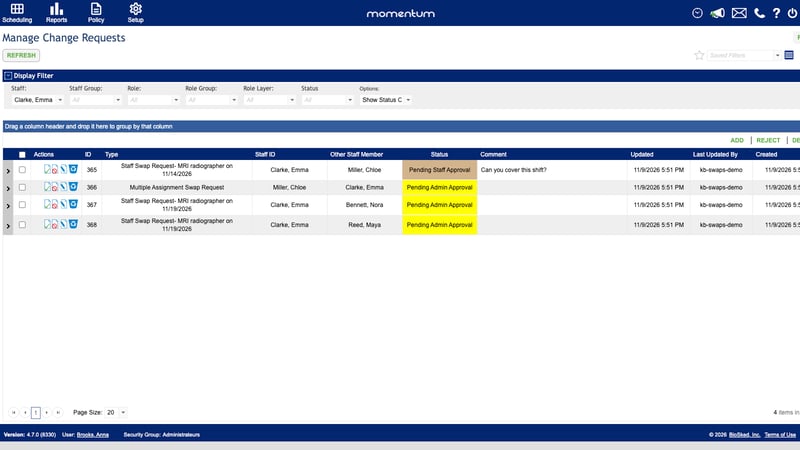
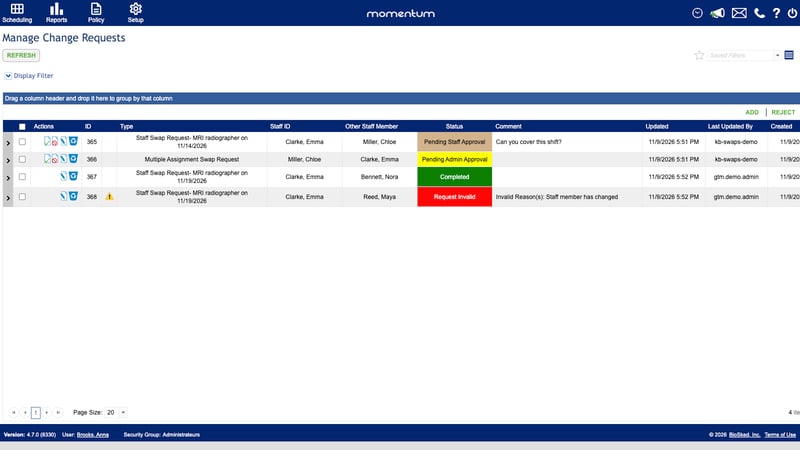
What happens to the other applications
The selected application changes the assignment and completes the offer. Competing applications can become invalid because the original assignment is no longer available to them. This is different from deliberately rejecting each person. A later edit or removal of the post can also invalidate an application.
Good to know
- Choose manually. There is no automatic winner based on who applied first, seniority or a score.
- Do not approve several competing applications together. There is only one assignment to award.
- Use the web for all applicants. The phone's personal request list is not the full approval queue.
- Do not assume every applicant receives an outcome message. Notification settings and the type of status change affect delivery.
For the permissions needed to review applications, see Set up swaps and the job board. If an approval fails, contact your customer success contact.