
Post your assignment on the job board so eligible colleagues can apply to take it. You stay responsible for it until a replacement is approved.
If posting is unavailable, ask your administrator. The phone calls an assignment a shift.
Post from your phone
- Open Schedule > My schedule, choose the date and tap your shift.
- Open View details if needed, then tap Post to board.
- Review the shift in the action panel and tap Post to board to confirm. This panel has no note field.
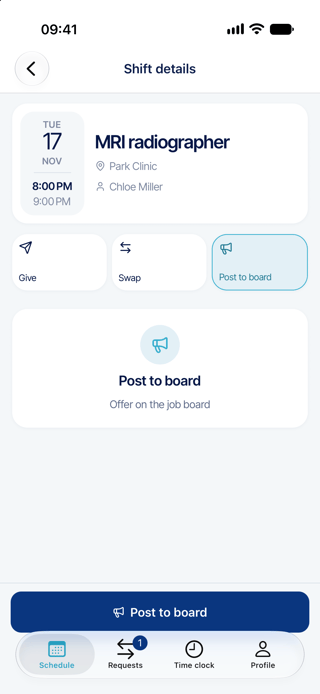
The offer becomes active immediately. An administrator does not need to approve the post itself.
Post from the web
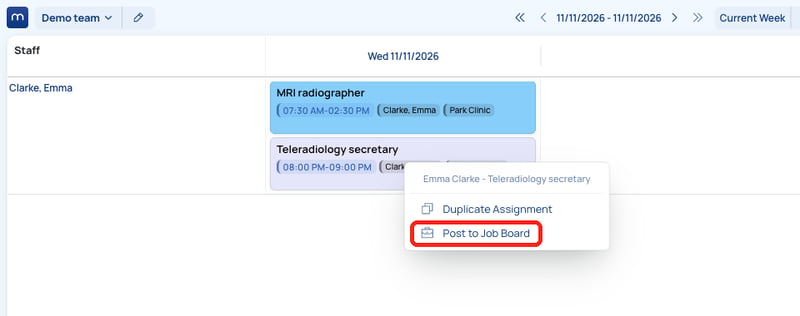
- Open Scheduling > View Schedule > Date View (new) and find your assignment.
- Right-click the assignment and choose Post to Job Board. The offer is active immediately. There is no comment field.
Remove your post
- On your phone, open your posted shift and tap Remove from board. Review the panel and confirm with Remove from board.
- On the web, right-click the posted assignment in Date View (new) and choose Remove from Job Board.
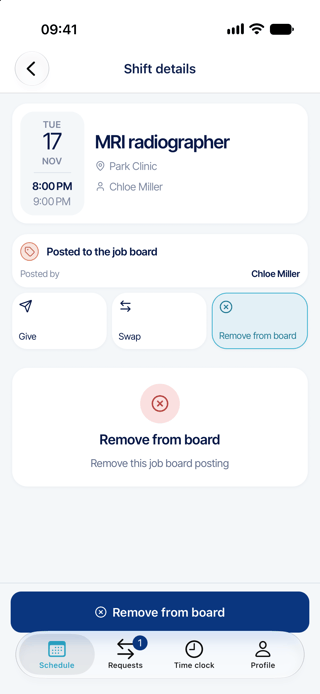
Removing the post stops the offer and makes linked applications invalid. It does not remove your assignment from the schedule.
Good to know
- An administrator chooses who gets the assignment. The first application does not automatically win.
- The role must be eligible for the board, and the assignment must be published and visible to eligible colleagues.
- Email and phone alerts depend on notification settings. Posting does not guarantee that every colleague gets a message.
- A swap can remove a related board post. Check the board again after a schedule change.
- If someone else created the post, removal may be unavailable on your phone. Ask your administrator.