
Use this guide when you first install Momentum on your phone or need to sign in again. You use the Momentum account provided by your organization.
Install the app
Download Momentum Scheduling by BioSked from the App Store or Google Play.
Find your instance and username
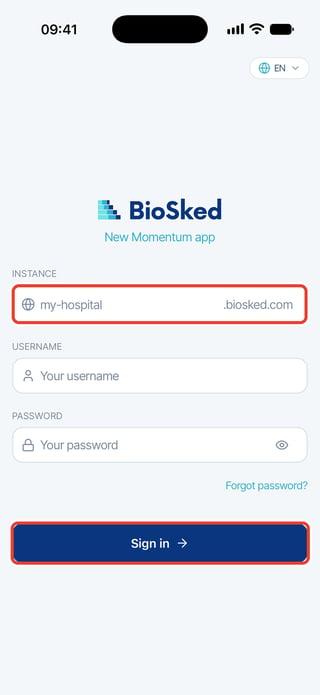
Your instance is the first part of your organization's Momentum web address, before .biosked.com. Enter only that part, without https:// or the rest of the address. Ask your administrator if you do not know it.
Your username is your assigned Momentum login ID. Use your email address only if your administrator has given you that address as your login ID.
Sign in on your phone
- Open the app and enter your instance in INSTANCE.
- If USERNAME and PASSWORD appear, enter your Momentum login ID and password.
- Tap Sign in.
If Sign in opens your browser
Some organizations sign in through a web page. After you enter your instance, the app shows Sign in and Other sign-in options. Tap Sign in, finish signing in in your browser, then return to the app.
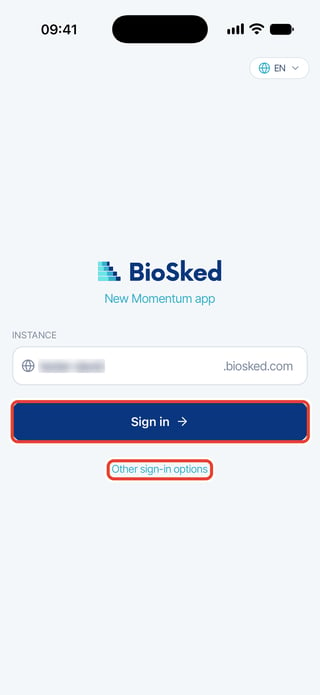
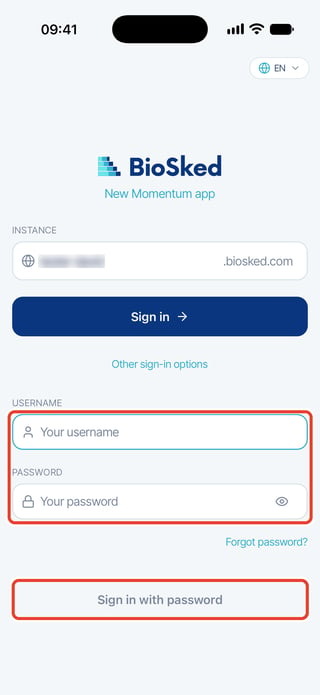
To use your Momentum password instead, tap Other sign-in options. Enter USERNAME and PASSWORD, then tap Sign in with password.
Sign in again on the same phone
For a site you have used before, tap its entry under Recent sites. Check that it is the right account and instance, then enter your password or finish signing in in your browser.
Sign in on the web
- Open your organization's Momentum web address.
- Enter your assigned login ID in User ID and your password in Password.
- Select Sign in or LOGIN TO MOMENTUM, depending on the page you see.
If you are taken to your hospital's sign-in page, use your hospital account.
Need help?
Still cannot sign in? Ask your administrator to check your account.
Face ID or fingerprint can unlock an existing app session when enabled. They do not replace account activation or recover a forgotten password.