There are several major differences between these two types of schedules.
Published schedules:
-
Can be viewed on the web and mobile apps by all providers and staff who have access.
-
Changes can send notifications, depending on your site’s notification settings and the recipients’ subscriptions.
-
Can be viewed on read only links.
-
Will not change if schedule is rebuilt.
Unpublished schedules:
-
Can be viewed by people who have permission to view unpublished schedules.
-
Editing an assignment that remains unpublished does not send assignment-change notifications.
-
Cannot be viewed on read only links.
-
Can be changed with a schedule rebuild if not locked (see How to Lock Assignments).
To publish a schedule
Go to Scheduling > View Schedule > Date View (new).
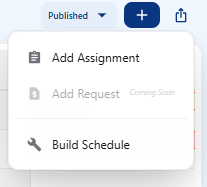
Click on the plus sign icon in the upper right corner.
Click on Build Schedule
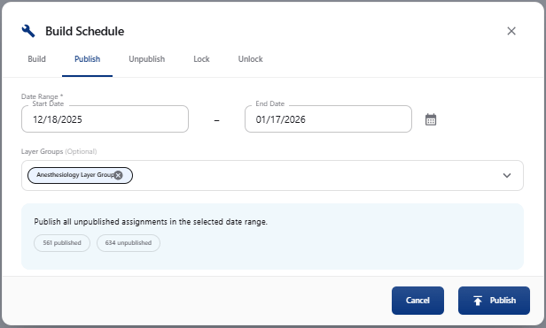
Click on Publish tab.
Select the desired start and end date of the schedule. Click on the calendar icon for popup.
Under Layer Groups, select the groups you want to publish; only groups you have permission to publish are available.
 Publishing or unpublishing sends schedule notifications only when this is enabled for your site and the recipients are subscribed.
Click on the Publish button to publish the schedule. A pop-up window will confirm that the schedule will be published down in the lower right corner.
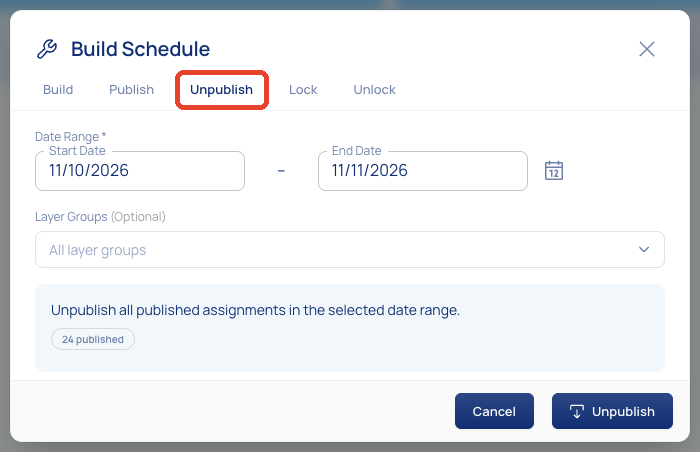
To unpublish a schedule, follow the same steps, select the Unpublish tab, then click Unpublish.