
If you forgot to clock, enter the time yourself from the Time clock tab. Your administrator then reviews it and approves or rejects it.
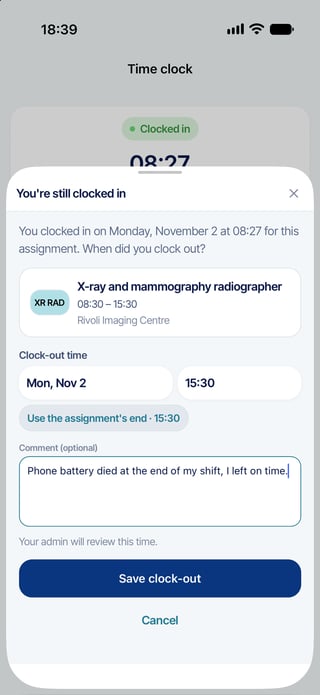
You forgot to clock out
- Open Time clock. The card shows Clocked in.
- Tap Forgot to clock out? under the button.
- Choose the time you left. The app suggests the end of your assignment: tap Use the assignment's end to keep it.
- If useful, add a note in Comment (optional) (up to 180 characters).
- Tap Save clock-out. The app confirms once that the time is recorded and needs your administrator's approval.
You forgot to clock in
- Open Time clock. The card shows Not clocked in.
- Tap Forgot to clock in?.
- Choose the time you arrived and, if useful, add a comment.
- Tap Save clock-in. You are now clocked in: remember to tap Clock out when you leave.
What happens next
The time you entered is flagged for review. Your administrator reviews it and approves or rejects it in Momentum. The app tells you once, when you save, that the time needs approval; it does not show a list of times waiting for approval. If a time you entered is wrong, tell your administrator.
Questions? Ask your Momentum administrator.