There are new options for formatting the schedule views. These icons are located in the lower right side of the page.

Grid Settings:
Use Auto Width Mode, 1st Column Width, Column Width, and Max. Row Height to adjust the grid.
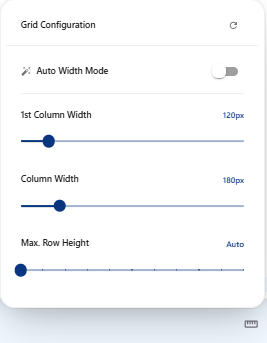
These settings can be saved in a filter.
Decrease Column Width:
The footer button reduces column width in 20 px steps, down to a minimum of 80 px.
Increase Column Width:
The footer button increases column width in 20 px steps, up to a maximum of 800 px.
These buttons turn off automatic width. Save the filter to keep the adjusted width in that filter.